Table of Contents
The Shopify Starter Plan is the most affordable entry point on the Shopify platform, designed for creators, influencers, and small-scale sellers who want to sell online without building a full ecommerce website. For just $5 per month (globally), this plan replaces the old Shopify Lite and lets you share product links across social media, messaging apps, and existing websites — all powered by Shopify’s trusted checkout infrastructure.
Instead of managing a traditional storefront, you simply upload your products, generate shareable links, and distribute them wherever your audience already is — Instagram bios, WhatsApp conversations, email newsletters, or even blog posts.
This lightweight approach is what makes the Starter Shopify option so appealing for those taking their very first steps into ecommerce. It strips away the complexity of website building and focuses entirely on enabling quick, frictionless transactions.
Table of Contents
Shopify Starter Plan Pricing: Global, India & UK
One of the biggest advantages of the Starter plan is how affordable it is across major markets:
- Global (USD): $5/month with a 5% transaction fee via Shopify Payments
- Shopify Starter Plan India: ₹399/month — a highly accessible price point for Indian entrepreneurs. Note that Shopify Payments is not available in India, so merchants must use third-party gateways like Razorpay or PayU, which carry their own processing fees typically ranging from 1.8% to 2.5% per transaction.
- Shopify Starter Plan UK: £5/month, with a 5% fee on transactions processed through Shopify Payments. UK merchants benefit from Shopify’s built-in VAT compliance tools, making tax management more straightforward.
Compared to the Basic plan ($29/month in the US, £25/month in the UK, ₹1,994/month in India on annual billing), the Starter plan is significantly cheaper — but that price difference comes with notable trade-offs that are worth understanding before you commit.
Key Features of the Starter Shopify Plan
Despite its low cost, the Starter plan includes a solid set of tools for social-first sellers:
Social commerce integrations. You can sell directly through Instagram, Facebook, TikTok, and WhatsApp by sharing product links or embedding buy buttons in posts, DMs, and bios.
Linkpop (link-in-bio tool). Shopify’s own link-in-bio page builder lets you direct followers to your top products in a single click — especially useful for Instagram and TikTok creators.
Buy buttons. Embed checkout buttons on any external website or blog without needing to migrate your entire site to Shopify.
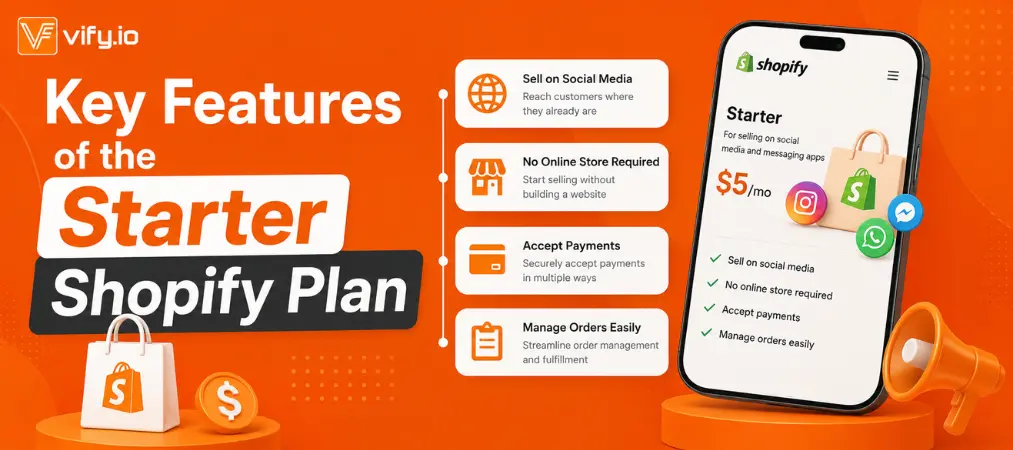
Secure checkout. Every transaction goes through Shopify’s industry-leading checkout, supporting credit cards, Apple Pay, Google Pay, and PayPal.
Basic order management. Track and manage orders, process payments, and communicate with customers from a single mobile-friendly dashboard.
In-person selling. All plans, including Starter, support Shopify POS Lite, so you can accept payments at pop-ups or markets using a smartphone.
Advantages: Why the Shopify Starter Plan Makes Sense
1. Extremely Low Barrier to Entry
At $5/month globally (and equivalents in India and the UK), the Starter plan removes the financial risk of trying ecommerce for the first time. There are no setup fees, and a free 3-day trial lets you explore the platform before paying anything.
2. Built for Social Sellers
The plan is optimized for platforms where social audiences already live. If you have an engaged following on Instagram or WhatsApp, you can start converting followers into paying customers in minutes — no website required.
For sellers who eventually want a complete branded store, learning how to build a full ecommerce website is the next step. Read this guide on Shopify website builders for ecommerce to have a closer insight!
3. Minimal Setup Time
Unlike launching a full Shopify store (which requires choosing themes, configuring navigation, setting up pages, and more), the Starter plan gets you live in just a few clicks. Upload a product image, write a description, set a price, and share your link.
4. Scalable When You’re Ready
Your product data, order history, and customer records are preserved if you decide to upgrade to Basic or beyond. The Starter plan is a low-risk starting point, not a dead end.
Limitations: What the Starter Plan Doesn’t Include
Honesty matters here. The Starter Shopify plan is not the right choice for every seller.
No Full Online Storefront
This is the most significant limitation. The Starter plan does not give you a website with a custom domain, navigation menus, product collections, or branded pages. Customers cannot browse your full catalog in one place — they only see what you link them to directly.
Higher Transaction Fees
The 5% transaction fee on Shopify Payments is noticeably higher than the 2% on Basic. For sellers processing meaningful revenue, those fees can quickly add up and offset the monthly savings.
No Blog or SEO Tools
The Starter plan lacks blogging capabilities and SEO customization features. This means you cannot build organic search traffic over time — a significant long-term disadvantage for content-driven sellers.
Limited Analytics
Detailed sales reports, customer behavior tracking, and performance dashboards are reserved for higher-tier plans. You get only basic metrics with Starter.
Not Suitable for Large Catalogs
If you sell more than a handful of products or need advanced inventory management across multiple locations, the Starter plan’s lightweight structure will quickly feel restrictive.
Shopify Starter Plan vs. Basic Plan: Which Should You Choose?
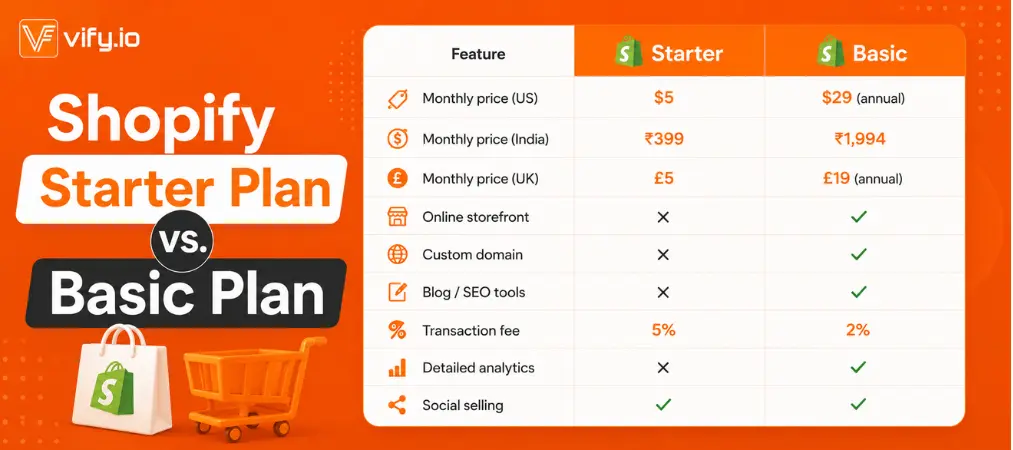
The Starter plan wins on price. The Basic plan wins on nearly everything else. Choose Starter if you’re validating an idea or selling exclusively through social channels with a small product range. Upgrade to Basic once you want a real branded storefront, SEO capabilities, or lower per-transaction costs.
How to Get Started with the Shopify Starter Plan
Setting up is straightforward:
Step 1: Visit shopify.com/starter
The Starter plan is only accessible via this direct link, as it does not appear on Shopify’s main pricing page.
Step 2: Create your account
Enter your email and answer a few setup questions about what you plan to sell and where.
- Add your products — upload images, write descriptions, and set prices. Save each product.
- Generate your product links — use the Share button on any product to get a shareable checkout link or an embeddable buy button.
- Set up payments — go to Settings → Payments and connect Shopify Payments (where available) or a third-party gateway like PayPal, Razorpay (India), or Stripe.
- Start selling — post your links on Instagram, send them via WhatsApp, add them to your email signature, or embed buy buttons on your existing blog.
Once you start getting customers, focusing on repeat purchases becomes just as important as making the first sale. Here’s a helpful guide to building a customer loyalty program.
Who Is the Shopify Starter Plan Right For?
The plan is an excellent fit for:
- Influencers and content creators with an existing social media following who want to monetize with minimal setup
- Side hustlers testing whether a product idea has real market demand before investing in a full store
- Brick-and-mortar shops that want a simple way to offer online purchases or take orders via messaging
- Entrepreneurs selling a small number of products who don’t need the overhead of a complete ecommerce website
It is not the right fit for:
- Businesses that need a branded website with a custom domain
- Sellers who want to build organic traffic through blogging and SEO
- Stores with large or complex product inventories
- Businesses that need detailed sales analytics or advanced marketing automation
Frequently Asked Questions
Can I upgrade from the Starter plan later?
Yes. You can move to Basic, Grow, Advanced, or Plus at any time without losing any of your product data, customer records, or order history.
Does the Shopify Starter Plan include a custom domain?
No. The Starter plan does not support a custom domain because there is no standalone storefront. You will need to upgrade to the Basic plan or higher for a branded website.

Is the Shopify Starter Plan available in India and the UK?
Yes. The Shopify Starter Plan India pricing is ₹399/month, and the Shopify Starter Plan UK pricing is £5/month. Both markets have access to the full feature set of the Starter plan, though Shopify Payments is only available in the UK, not in India.
What payment methods are supported?
The plan supports Shopify Payments (in eligible countries), PayPal, Stripe, and regional gateways. In India, third-party gateways such as Razorpay and PayU are commonly used.
Final Verdict
The Shopify Starter Plan does exactly what it promises: it gives you a fast, low-cost way to start selling online through social media and messaging apps, backed by Shopify’s reliable checkout technology. For just $5/month globally — or ₹399 in India and £5 in the UK — the barrier to entry has never been lower.
That said, it is a starting point, not a destination. The lack of a full storefront, the absence of SEO and blogging tools, and the higher transaction fees mean most growing businesses will eventually need to upgrade. Think of the Starter plan as an ideal launchpad: use it to validate your products and build initial momentum, then graduate to a more capable plan when the time is right.
If you’re a creator, influencer, or first-time seller ready to test the ecommerce waters without a big upfront commitment, the Shopify Starter Plan is one of the smartest ways to begin.