Table of Contents
If you’ve started comparing ecommerce platforms, you’ve probably noticed that Shopify’s pricing page looks simple on the surface but gets complicated fast once you factor in transaction fees, add-ons, and annual discounts. Understanding Shopify monthly pricing before you sign up can save you from picking a plan that’s either too limited for your sales volume or more expensive than your store actually needs.
This guide breaks down the monthly pricing of Shopify plan by plan, explains where the hidden costs hide, and helps you figure out which tier actually fits your business stage — not just your budget on paper.
Table of Contents
What Does Shopify Cost Per Month?
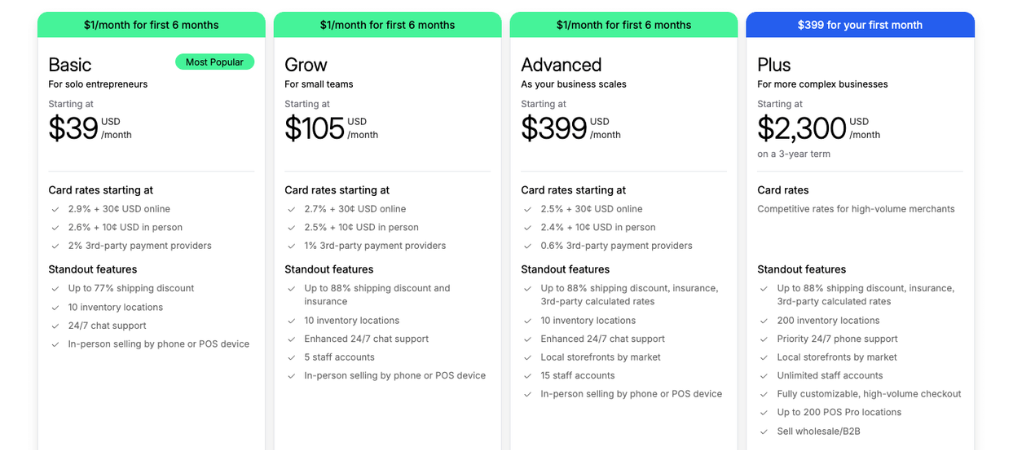
Shopify pricing currently spans five tiers, and the gap between the cheapest and most expensive option is enormous — from a few dollars a month to several thousand. Here’s the current monthly fee structure for each plan:
| Plan | Monthly Fee (Paid Monthly) | Monthly Fee (Paid Annually) | Best For |
|---|---|---|---|
| Starter | $5/month | N/A | Selling via social media, chat apps, or a simple checkout link |
| Basic | $39/month | ~$29/month | New stores just getting started |
| Grow | $105/month | ~$79/month | Growing businesses needing more reporting and staff accounts |
| Advanced | $399/month | ~$299/month | Established merchants scaling fast |
| Plus | From ~$2,300/month | Custom enterprise pricing | High-volume or enterprise operations |
A few things worth noting right away: the Starter plan doesn’t give you a full storefront — it’s essentially a checkout link for selling on social platforms. Most merchants who want an actual online store start at Basic, which is why $39/month (or $29 with annual billing) is the realistic entry point for a lot of small businesses, even though the headline price often quoted is $5.
Starter Plan ($5/month)
This is the cheapest way to start selling on Shopify, but it’s built for a narrow use case. You get a shareable checkout link, basic point-of-sale tools, and the ability to sell through Instagram, TikTok, Facebook, and WhatsApp — without a full website. It’s a reasonable starting point if you’re testing a product idea before investing in a complete store.

Basic Plan ($39/month or ~$29/month annually)
Basic is where most new ecommerce businesses land. It includes a full online storefront, unlimited products, basic reporting, and Shopify POS Lite for in-person sales. Online transaction fees sit around 2.9% plus 30 cents per transaction if you use Shopify Payments, with a higher rate if you route payments through a third-party processor instead.
Grow Plan (~$105/month or ~$79/month annually)
Formerly just called the “Shopify” plan, Grow adds more staff accounts, deeper reporting, abandoned cart recovery, and gift cards. Transaction fees drop slightly compared to Basic, which starts to matter once your monthly revenue climbs — the savings on processing fees can offset the higher subscription cost.

Advanced Plan (~$399/month or ~$299/month annually)
Advanced is aimed at merchants with consistent, higher-volume sales. It includes the lowest standard transaction fees on the non-enterprise tiers, advanced report building, and higher API call limits — useful if you’re running multiple apps or integrations that need to talk to your store in real time.

Plus Plan (from ~$2,300/month)
Shopify Plus is the enterprise tier, and its shopify pricing structure works differently from the rest. You’re typically looking at a contract rather than a simple monthly subscription, with the base fee covering a set amount of monthly sales volume before additional revenue-share fees kick in. Plus also unlocks checkout customization, multiple expansion stores, and dedicated support — features smaller plans simply don’t offer.

Transaction Fees: The Cost Most People Miss
Subscription price is only half the story. Every plan also carries a per-transaction processing fee, and this is where a lot of merchants get caught off guard. If you use Shopify Payments, the platform fee disappears, but you still pay a card processing rate that decreases as you move up the pricing tiers. If you use an external payment gateway instead of Shopify Payments, you’ll pay an additional transaction fee on top of whatever your gateway charges — which is why most merchants stick with Shopify Payments wherever it’s available.
This is one of the most overlooked parts of the monthly pricing of Shopify: two stores on the same plan can end up with very different total costs purely based on sales volume and which payment processor they use.
Hidden Costs Beyond the Subscription
The advertised monthly fee rarely reflects what merchants actually spend. Once you add apps for email marketing, reviews, upsells, or inventory management, a custom or premium theme, a domain name, and possibly paid traffic, real-world monthly spend for an active store often lands well above the base subscription — sometimes by a factor of three or four. Budgeting for these extras upfront avoids the surprise of a much larger bill once your store is actually live and running.
If you’re managing order documentation as part of that growing toolkit, it’s worth checking how an automated PDF invoice and order printer setup can save hours on manual paperwork as your order volume increases — something that becomes especially relevant once you move past the Basic plan and start processing higher volumes.
Monthly vs. Annual Billing: Which Saves More?
Shopify rewards annual commitments with a meaningful discount — typically around 25% off the monthly rate on Basic, Grow, and Advanced plans. The trade-off is flexibility: annual plans lock you in until the contract term ends, while monthly billing lets you cancel or switch plans whenever you need to. If you’re confident in your business model and want to cut costs, annual billing makes sense. If you’re still validating demand or expect to scale quickly, monthly billing keeps your options open.
How to Choose the Right Plan for Your Budget
Picking a plan isn’t just about finding the lowest number. A few practical questions can narrow it down quickly:
Are you selling primarily through social media or a marketplace? Starter might genuinely be enough.
Are you launching your first standalone store? Basic covers the essentials without overpaying for features you won’t use yet.
Do you have a small team and need better reporting? Grow’s staff accounts and analytics usually justify the price jump.
Is your store processing high volume consistently? Advanced’s lower transaction fees can pay for themselves.
Are you running a large operation with complex logistics? Plus is built for that scale, with the pricing to match.
It’s also worth revisiting your plan every few months. A store that outgrows Basic’s reporting limits, or one that’s paying Advanced-level fees without the sales volume to justify it, is a common and easily fixable mistake. For merchants comparing tools to streamline operations at any tier, browsing through Shopify-focused guides and tutorials can help you spot which upgrades — whether platform-level or app-level — actually move the needle for your specific store.
Final Thoughts
Shopify monthly pricing structure is flexible by design, which is both its strength and its biggest source of confusion. The headline numbers — $5, $39, $105, $399, $2,300+ — only tell part of the story, since transaction fees, payment processor choice, and billing frequency all shape what you actually pay each month.
Before committing, map out your expected sales volume and feature needs against each tier, rather than defaulting to the cheapest or most popular option by name alone. Once your store is up and running, the right set of tools can make a bigger difference to your bottom line than which plan you picked — explore Vify Order Printer to see how automating invoices, loyalty, and other store essentials can help you get more value out of whichever plan you choose.