Table of Contents
Most Shopify merchants put enormous effort into their storefronts, product pages, and marketing funnels — then ship a completely generic invoice to every customer. That disconnect matters more than most people realize. Your invoice is often the final branded document a customer receives after a purchase, and it quietly signals whether you run a professional business or just another generic online shop.
This guide walks you through everything you need to know to customize invoice templates on Shopify: what a solid custom invoice should contain, how to make changes without a developer, what a real custom invoice sample looks like, and which tool makes the entire process fast and code-free.
Table of Contents
Why Your Invoice Does More Than Request Payment
The invoice is easy to overlook because it arrives after the sale is already done. But that is exactly why it matters. Post-purchase is when customer perception solidifies. A clean, on-brand invoice reinforces confidence. A sloppy or generic one quietly undermines it.
There are three concrete reasons to take invoice customization seriously:
Brand consistency at every touchpoint. You have invested in a cohesive look across your store, emails, and packaging. A default Shopify invoice breaks that chain. A branded one completes it.
Legal compliance for international sellers. If you sell to customers in the EU, UK, Canada, or other regulated markets, your invoices may legally need to include a sequential invoice number, your VAT or tax registration number, your registered business address, and an itemized tax breakdown. Shopify’s default order confirmation does not always meet these requirements.
Customer retention and repeat purchases. A polished invoice with a thank-you message or a small discount code for the next order is one of the cheapest retention tools available. It costs nothing to add and gives customers a reason to come back.
What Every Professional Custom Invoice Must Include
Before choosing a tool or template, it helps to understand what belongs on a well-structured custom invoice. Think of it in two layers.
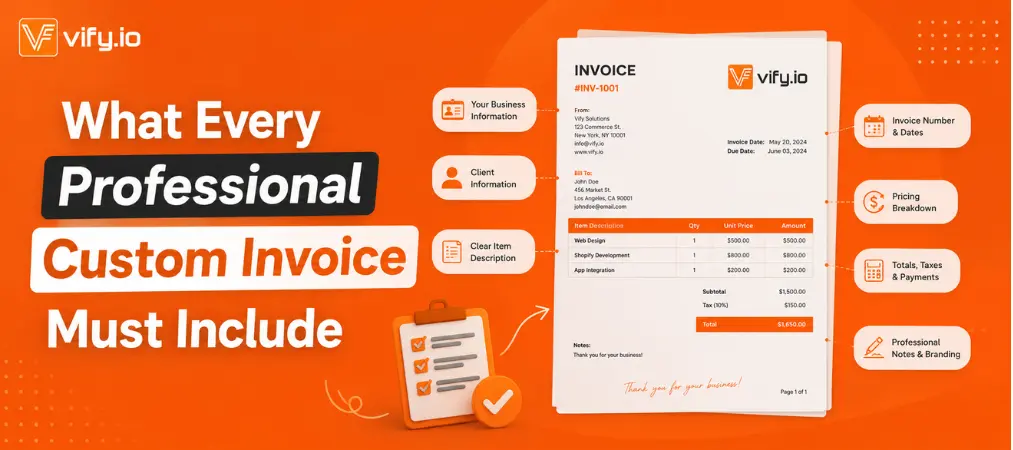
Required fields — the functional foundation:
- Your business name, address, email, and phone number
- Customer name and billing or shipping address
- A unique, sequential invoice number
- Invoice date and Shopify order reference number
- Itemized line items: product names, quantities, unit prices, and SKUs
- Subtotal, discounts, shipping costs, and taxes — each broken out separately
- Total amount due, clearly stated in the correct currency
- Payment status (paid, pending, or refunded)
Optional branding fields — what separates forgettable from memorable:
- Your logo in the header
- Brand colors used for section dividers, headers, or accents
- A custom footer with a thank-you note, return policy link, or next-order discount code
- Your website URL and social media handles
- Typography that matches your storefront
Getting both layers right is what turns a receipt into a branded asset.
Two Ways to Customize Invoice on Shopify
There is no single right method. The best approach depends on how much control you need, your technical comfort level, and whether your customers need a downloadable PDF.
Option 1: Edit Shopify’s Default Order Notification Email
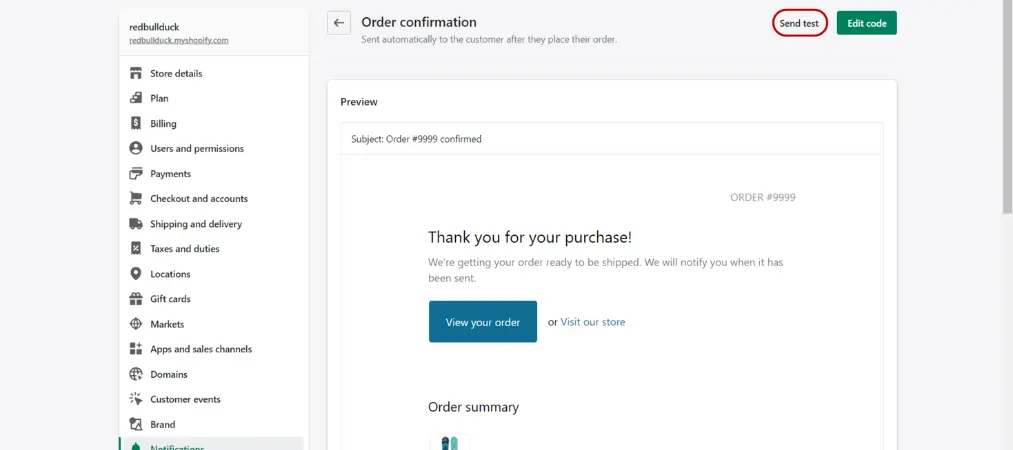
This is the quickest starting point and costs nothing. Every Shopify store sends an automatic order confirmation email after purchase. You can edit this template directly from your admin.
Steps:
- Go to Settings → Notifications in your Shopify admin
- Under the Order section, click Order confirmation
- In the HTML/Liquid editor, you can add your logo with an
<img>tag, change the header background color, insert a custom thank-you message, and include a discount code for the next purchase
Where this falls short:
This method only modifies the email notification — not a standalone PDF invoice. If your customers need a downloadable, printable document for accounting or expense reporting purposes, this approach alone will not be enough. It also applies the same template to every order with no per-customer flexibility.
Option 2: Use a Dedicated Shopify Invoice App
For merchants who want full control — branded PDF invoices, automated delivery, multi-language support, and compliance-ready formats — a dedicated app is the right choice. This is the method used by the majority of professional Shopify stores, and for good reason: the right app eliminates every manual step between a completed order and a polished invoice landing in your customer’s inbox.
If you are still exploring your options, our breakdown of the best Shopify invoice generator tools covers the top free and paid apps available right now, including a side-by-side comparison of features to help you pick the right fit for your store.
The best invoice apps give you a no-code template editor, automatic PDF generation, and the ability to send invoices as attachments triggered by order events — with zero manual work per order. Most also handle more than just invoices: packing slips, refund receipts, delivery notes, and B2B documents can all be generated from the same app, which becomes especially valuable as your order volume grows.
Meet Vify: The Shopify Invoice App Built for Every Store Size
Vify Shopify Order Printer app is one of the most widely used invoice apps on the Shopify App Store, holding a 4.9-star rating across more than 1,100 reviews and carrying the “Built for Shopify” badge — Shopify’s designation for apps that meet the highest standards for performance, design, and platform integration.
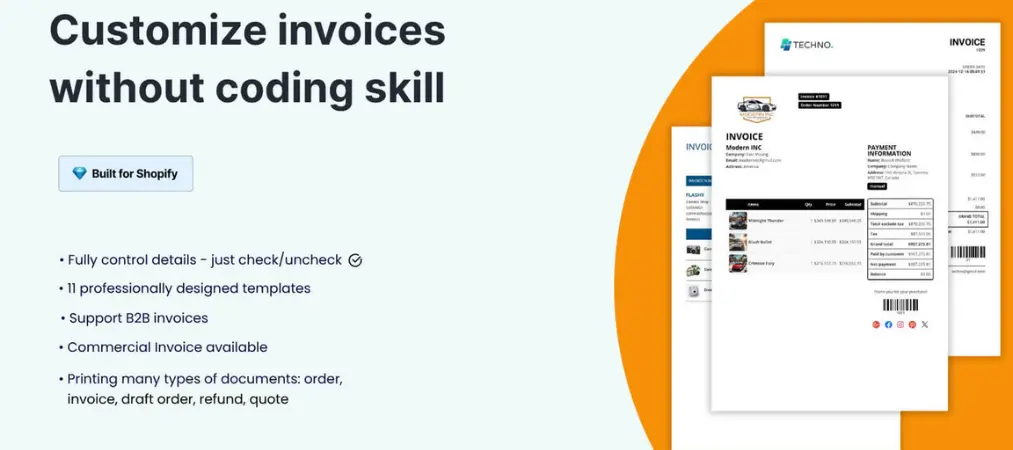
What Vify Does
Vify handles the full document workflow for Shopify merchants: PDF invoices, packing slips, refund receipts, delivery notes, commercial invoices, and B2B invoices — all from a single app. The no-code template editor lets you add your logo, set brand colors, choose fonts, toggle fields on or off, and customize footers without writing a single line of code.
Core features at a glance:
- No-code template editor with full branding control (logo, colors, fonts, custom fields)
- Automatic PDF invoice delivery via email, triggered by order events
- Bulk print and download for multiple orders at once
- Multi-language and multi-currency support for international stores
- Sequential invoice numbering and custom invoice number formatting
- B2B invoice support with automatic VAT number capture
- European e-invoicing standards (ZUGFeRD and Factur-X)
- Works with Shopify POS, Shopify Flow, and Customer Accounts
- Near-24/7 support with a responsive team known for same-day customization help
Pricing
| Plan | Price | Key Highlights |
|---|---|---|
| Free | $0/month | Customizable templates, 50 latest orders, frontend PDF download |
| Starter | $10.99/month | Unlimited orders, bulk process, email automation, custom invoice numbers |
| Premium | $29.99/month | Additional templates, commercial invoices, custom sender email, product metafields |
| Ultimate | $69.99/month | Priority live chat, free custom templates, full API access (coming soon) |
All paid plans include a 14-day free trial.
Pros
- Unlimited orders on all paid plans — no per-order fees that punish growth
- Strong free plan for merchants just getting started
- Covers every document type most stores need (invoices, packing slips, refunds, B2B)
- EU/UK compliance features built in
- Consistently praised support team in merchant reviews
Cons
- Advanced template customization (custom HTML/CSS) is reserved for higher-tier plans
- The free plan caps at the 50 most recent orders, which may not suit high-volume stores testing before upgrading
- API access is listed as coming soon, not yet available
Who It’s Best For
Vify works well for merchants at any stage — from early-stage stores that need a professional invoice quickly, to established B2B operations that require compliance-ready documents and automated workflows. It is particularly strong for international stores that need multi-language invoices and for EU sellers who need VAT-compliant document formats.
If your store is also dealing with high order volume or a fulfillment team that needs printed documents, it is worth reading up on how a proper order printer Shopify setup can speed up your warehouse workflow significantly — not just your customer-facing invoices.
What a Great Custom Invoice Sample Actually Looks Like
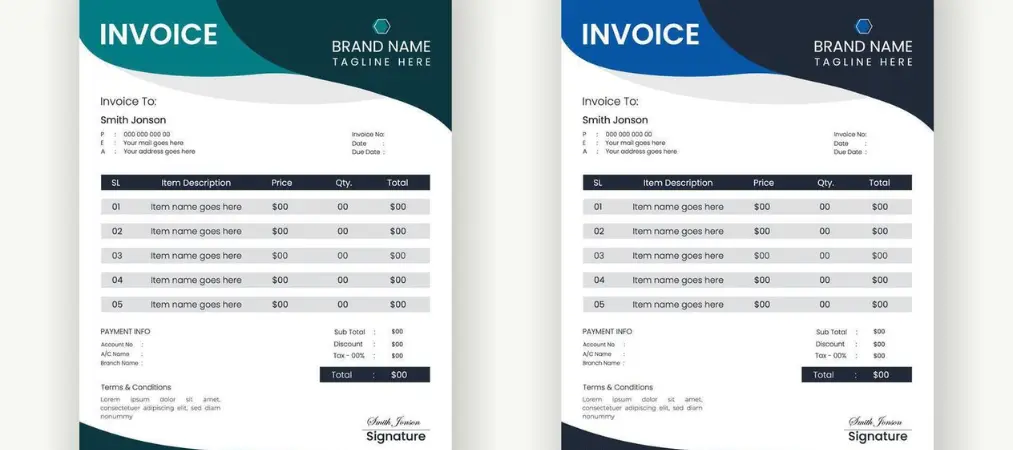
A strong custom invoice sample is clean, easy to read, and immediately recognizable as belonging to your brand. Here is what the best ones have in common:
Header: Your logo sits prominently at the top, alongside your business name and contact information. Brand colors appear here without overwhelming the document.
Invoice metadata: Invoice number, issue date, and order reference appear clearly — ideally in a two-column layout so they are easy to scan at a glance.
Line items table: Each product gets its own row with name, SKU (if applicable), quantity, unit price, and line total. Column headers are clear. The table is well-spaced and readable at a small print size.
Totals block: Subtotal, shipping, tax (itemized by rate), and the final total are stacked in a right-aligned block. The total amount due is larger and visually dominant.
Footer: A brief thank-you message, your return policy URL, and optionally a discount code for the next order. This is the section most merchants skip — and one of the easiest places to create a memorable post-purchase moment.
Vify provides a library of pre-built custom invoice sample templates you can install with a single click, then customize with your own branding. Whether you want a minimalist layout for a modern brand, a detailed VAT invoice for European orders, or a premium design for wholesale clients, the template library covers most use cases without requiring any design work from scratch.
Shopify Invoice Customization: Common Mistakes to Avoid

Even merchants who invest time in invoice design often make the same few errors:
Skipping the invoice number. This is not optional if you sell in regulated markets. Sequential invoice numbering is a legal requirement in the EU and many other regions, and Shopify’s default does not generate one automatically.
Using low-resolution logos. A blurry logo on a PDF invoice looks worse than no logo at all. Use an SVG or a high-resolution PNG (at least 300 DPI) for clean rendering.
Overloading the footer. A thank-you note and a single CTA (discount code or website link) work well. Adding your full return policy, multiple social handles, and a newsletter signup in the footer turns a clean document into a cluttered one.
Setting it up once and never revisiting. Your branding evolves. Your invoice template should too. Schedule a quarterly review to make sure it still matches your current brand.
Final Thoughts
Taking the time to customize invoice documents on Shopify is one of the highest-leverage, lowest-cost improvements available to any merchant. It improves perceived professionalism, supports legal compliance, and creates a stronger post-purchase experience — all from a document most businesses treat as an afterthought.
Starting with a ready-made custom invoice sample template is the fastest path forward. It eliminates the design work while giving you a professionally structured foundation to build on.
If you are looking for a tool that handles the full invoice workflow — PDF generation, automated delivery, multi-language support, and compliance-ready formatting — without requiring any coding skills, Vify Order Printer PDF Invoice is worth trying. The free plan covers the essentials, and paid plans start at $10.99/month with unlimited orders included.
Start building a branded invoice experience for your store today at orderprinter.vify.io.