Table of Contents
Starting a Shopify online store is one of the most accessible ways to launch a business today — but accessible doesn’t mean easy. Thousands of stores open every week, and most struggle to gain traction not because of their products, but because of how (or how poorly) the store is set up, structured, and presented.
This guide cuts through the noise to give you what actually works: from the very first setup steps to the growth habits that separate thriving stores from abandoned ones. Whether you’re building from scratch or fixing an existing store, every section below is actionable.
Table of Contents
Everything You Need to Run a Shopify Online Store Successfully
Before diving deep, here’s the bird’s-eye view of what this guide covers — and what your store actually needs to succeed:
- A solid foundation: the right theme, domain, and analytics tools from day one
- Product pages that convert: original descriptions, optimized titles, and proper image alt text
- A navigable store structure: clear collections, smart internal linking, and a logical hierarchy
- Sustainable traffic: SEO and content marketing that compound over time without ad spend
- A measurement habit: conversion rate tracking, A/B testing, and quarterly SEO reviews
Get these five things right, and you have more than a store — you have a business.
Building a Shopify Online Store That Works
Step 1: Lay the Right Foundation Before You Launch

Before you add a single product, get these non-negotiables in order:
Choose a clean, fast theme. Shopify’s free themes (like Dawn or Sense) are well-optimized and load quickly. Resist the urge to over-customize before you understand your customers. Speed matters — both for user experience and search engine rankings.
Set up a custom domain. A branded domain (yourstore.com instead of yourstore.myshopify.com) builds trust immediately. It signals that this is a real business, not a side experiment.
Connect Google Search Console and Google Analytics. These two free tools are your store’s nervous system. They tell you who’s visiting, where they’re coming from, and what they’re doing once they arrive. Set them up on day one, not month three.
Configure your meta titles and descriptions. Every page in your store — homepage, collections, products, blog posts — should have a unique meta title and description. These are what appear in Google search results and directly influence whether someone clicks through to your store.
Step 2: Build Product Pages That Do the Selling for You
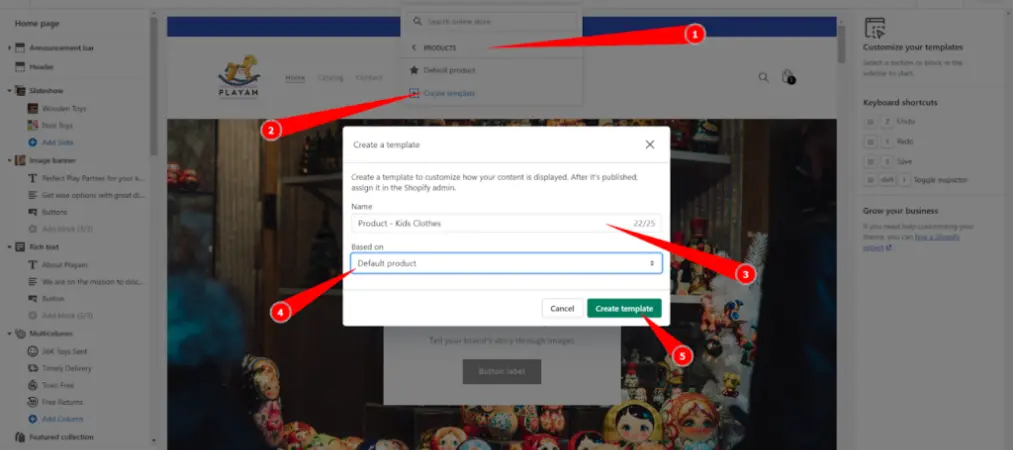
The most common mistake merchants make when they shop on Shopify as customers — then try to replicate — is copying the surface level without understanding what drives conversions underneath.
Strong product pages have three things working together:
A keyword-rich, clear product title. Don’t be clever; be descriptive. “Men’s Slim-Fit Chino Pants — Navy Blue” outperforms “The Explorer” every time for both SEO and conversions.
Original, detailed product descriptions. Generic manufacturer descriptions hurt your SEO and do nothing to convince a buyer. Write for the customer who’s almost ready to buy but has one lingering doubt. Address that doubt directly.
High-quality images with descriptive alt text. Alt text isn’t just for accessibility — it’s an SEO signal. “blue-running-shoes-mens-size-10.jpg” tells Google far more than “IMG_4823.jpg.”
Step 3: Structure Your Store So Both Shoppers and Search Engines Can Navigate It

A shop on Shopify online store that’s hard to navigate is one that loses customers at every turn. Your site structure should follow a simple logic: Homepage → Collections → Products. No more than three clicks from the homepage to any product.
Create collections (categories) that match how your customers think, not how your warehouse is organized. If you sell skincare, your customers think in terms of “moisturizers,” “serums,” and “sunscreen” — not “SKU group A” or “Spring 2024 drop.”
Internal linking is often overlooked but powerful. When you publish a blog post about a skincare routine, link naturally to the moisturizer collection and the specific serums you recommend. This signals to search engines that your content and products are related, building topical authority over time. Building repeat customers requires more than great products — it starts with seamless post-purchase experiences. Learn how a customer loyalty program can turn first-time buyers into long-term advocates for your brand.
Step 4: Drive Traffic Without Relying Entirely on Paid Ads

Many new merchants make the mistake of launching paid ads before their store is optimized. Paid traffic to a leaky store is just burning money. Fix the store first, then invest in traffic.
SEO is your most durable traffic source. It takes time — typically three to six months before you see meaningful organic results — but once you rank, that traffic is essentially free and compounds over time. Focus on long-tail keywords: specific phrases that real buyers use when they’re close to purchasing.
Content marketing amplifies your SEO. A blog isn’t just filler — it’s a way to rank for informational queries that bring in buyers at the top of the funnel. A pet store could write “how to choose the right dog food by breed” and capture a massive audience that didn’t know about the store but is clearly in the market for what it sells.
Social proof accelerates everything. Reviews, user-generated content, and testimonials reduce purchase anxiety. A Shopify online shop with 50 genuine reviews will almost always outconvert one with no reviews, even if the product and price are identical.
Step 5: Measure, Adjust, and Keep Improving

The merchants who build lasting businesses on Shopify treat their store like a living thing — something that requires ongoing attention, testing, and adjustment.
Watch your conversion rate. The industry average for ecommerce is around 1–3%, but top-performing stores regularly hit 4–5% or higher. If yours is below 1%, something fundamental is wrong: trust signals, site speed, product-market fit, or all three.
Run A/B tests on product pages, homepage hero sections, and checkout flows. Even small changes — a different call-to-action button color, a reworded headline, a trust badge placed near the checkout button — can meaningfully shift conversion rates over time.
Revisit your SEO quarterly. Search behavior shifts. New competitors emerge. Keywords that worked six months ago may be saturated now, while new opportunities open up. Staying current isn’t optional — it’s the price of long-term visibility.
What to Do Right After Your Store Goes Live
Launching your Shopify online store is a milestone — but the work doesn’t stop at the finish line. The first two weeks after going live are critical for setting the right signals to both customers and search engines.
Submit your sitemap to Google Search Console. Shopify automatically generates a sitemap at yourstore.com/sitemap.xml. Submit it right away so Google can begin crawling and indexing your pages faster.
Share your store across channels. Post on your personal social accounts, email your existing contacts, and ask friends or colleagues to visit the store. Early traffic — even non-buying traffic — signals to search engines that your store is active and worth indexing.
Set up abandoned cart recovery. Shopify’s built-in abandoned checkout emails are free and effective. Enable them immediately. The average cart abandonment rate in ecommerce is around 70%, and a well-timed follow-up email recovers a meaningful portion of those lost sales.
Audit your store from a customer’s perspective. Place a real test order. Check every confirmation email, the order summary page, and the post-purchase experience end to end. This is where merchants discover broken flows — the kind that silently cost sales every single day. A professional order confirmation and invoice setup, like Vify Order Printer PDF Invoice, can make your post-purchase experience feel polished and trustworthy from the very first order.
Common Pitfalls That Hold Shopify Stores Back

Even well-intentioned merchants make mistakes that quietly undermine their store’s performance. Here are the ones that appear most often — and how to sidestep them.
Skipping the mobile experience. Over 70% of ecommerce traffic now comes from mobile devices. If you only ever check your store on a desktop, you’re missing how most of your customers actually see it. Test every page on your phone before and after launch.
Using duplicate or thin product descriptions. Copy-pasting manufacturer content is tempting when you have dozens of products to list. But duplicate content is penalized by search engines, and generic descriptions don’t persuade buyers. Even 100 words of original, specific copy per product is better than nothing.
Neglecting page speed. Every extra second of load time costs conversions. Uncompressed images, too many third-party apps, and bloated themes are the most common culprits. Use Google PageSpeed Insights regularly and treat it as a health check, not a one-time task.
Over-relying on apps. The Shopify App Store is full of useful tools, but every app you install adds weight to your store and a monthly fee to your overhead. Install only what solves a documented problem. More apps doesn’t mean a better store.
Ignoring post-purchase communication. Most stores focus all their energy on the pre-purchase journey and then go silent after the sale. Order confirmations, shipping updates, and invoices are touchpoints that build trust and encourage repeat purchases — yet they’re often left at Shopify’s bare defaults.
Frequently Asked Questions About Running a Shopify Online Store

How much does it cost to start a Shopify online store?
Shopify’s Basic plan starts at $39/month (billed monthly) or less if you commit annually. Beyond the platform fee, budget for a custom domain (around $14/year), any paid apps you choose to install, and your initial product inventory or samples.
Do I need technical skills to build a Shopify online shop?
No. Shopify is designed to be used without coding knowledge. You can set up a fully functional store using built-in tools and free themes. That said, basic familiarity with how to organize content, write product descriptions, and navigate a dashboard will help you move faster.
How long does it take to make the first sale on a Shopify online store?
This varies widely. Merchants who drive traffic through existing social media audiences or email lists sometimes see their first sale within hours of launching. Stores that rely entirely on organic SEO should expect to wait weeks to months. The fastest path to a first sale is typically a combination of personal outreach and a small, targeted paid ad campaign.
Is Shopify good for SEO?
Yes — Shopify has solid built-in SEO foundations: clean URL structures, automatic sitemap generation, canonical tags, and the ability to customize meta titles and descriptions on every page. The platform won’t do the SEO work for you, but it gives you everything you need to do it well.
Can I run a Shopify online store without holding inventory?
Absolutely. Dropshipping and print-on-demand models let you sell products without stocking them yourself. Shopify integrates natively with major suppliers and fulfillment services that handle storage and shipping on your behalf.
The Bottom Line
A successful Shopify online store isn’t built in a day, but it can absolutely be built — by almost anyone — if the fundamentals are done right from the start. Solid site structure, compelling product pages, a content strategy that drives organic traffic, and a relentless focus on the customer experience: these are the levers that matter.
The merchants who treat their store as a long-term business — not a quick flip — are the ones who still have growing, profitable stores two and three years from now. Start with intention, optimize consistently, and the results will follow.