Table of Contents
Choosing the right Shopify template is one of the most impactful decisions you will make for your online store. The good news? You do not need to spend hundreds of dollars. Today’s best free Shopify templates are built by Shopify itself, optimized for speed, mobile responsiveness, and conversion — and they are completely free to use.
This guide walks you through everything you need to know about best free Shopify templates: what these templates offer, how they compare, and which one fits your business best.
Table of Contents
What Are Shopify Templates?
Shopify templates — also called themes — are pre-built design frameworks that control your store’s layout, typography, navigation, and overall shopping experience. Built on Shopify’s Online Store 2.0 infrastructure, they use a drag-and-drop section system that lets you customize pages without writing a single line of code.
Every store has a match among the best templates Shopify provides for free. And if you are still exploring how to set up your store the right way, our guide on must-know Shopify features for store owners covers the essential tools and settings every merchant should configure from day one.
At a technical level, a Shopify template determines:
- Page layout and section architecture
- Mobile responsiveness and breakpoints
- Image loading behavior and lazy loading
- Navigation structure across collections and products
- Core Web Vitals performance (LCP, CLS, INP)
A poorly chosen template creates friction at every step of the buyer journey. A well-optimized one reduces decision fatigue, loads fast on mobile, and guides shoppers naturally toward purchase.
Why Not Stick With the Default Theme?
There is a common misconception that free means basic. Nowadays, that could not be further from the truth. Shopify’s free templates now deliver enterprise-grade performance, mobile-first design, and full compatibility with third-party apps — all at zero cost.
Here is how free and premium templates compare:
| Area | Free Shopify Templates | Premium Shopify Templates |
|---|---|---|
| Cost | $0, maintained by Shopify | $200–$400 upfront |
| Performance | Built for speed and Core Web Vitals | Varies by vendor |
| Flexibility | Modular sections and blocks | More visual presets |
| Risk | Low, updated by Shopify | Depends on vendor updates |
| Best for | Most DTC and growing stores | Highly stylized niches |
For most merchants, a free Shopify template provides everything needed to launch, grow, and scale a high-performing store.
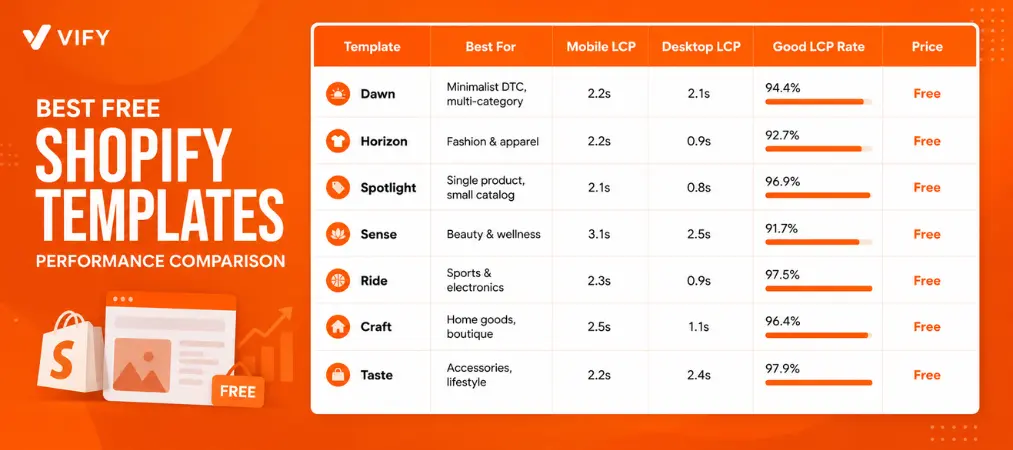
Free Shopify Templates: A Quick Snapshot
Best Free Shopify Templates for Shopify Merchants
1. Dawn — Best for Minimalist DTC Brands
Dawn is Shopify’s flagship free template and the default choice for new stores. It is media-forward, lightweight, and purpose-built for conversion without unnecessary design complexity.
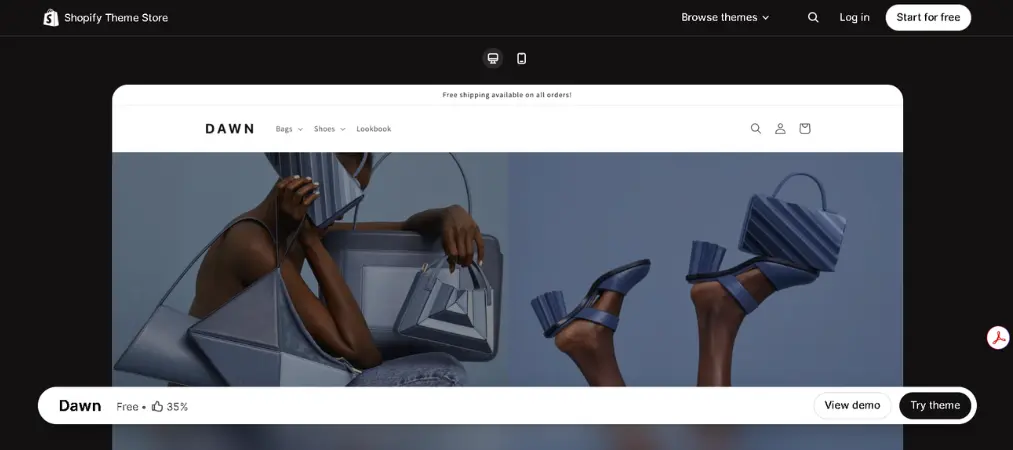
Features:
- Sticky header navigation
- Advanced product filtering and search
- Mega menu support
- Quick buy functionality
- Full Online Store 2.0 compatibility with drag-and-drop sections
Pricing: Free
Pros:
- Consistently ranked among the fastest Shopify templates available
- Clean, minimal design works across nearly every product category
- Maintained directly by Shopify with regular updates
- Strong real-world performance: 94.4% of Dawn stores achieve a “Good” LCP score
Cons:
- Limited visual drama — less suited for editorial or highly styled brands
- Fewer built-in layout presets compared to some newer templates
- May feel generic for brands with a strong visual identity
Best for: Small to medium catalogs, multi-category DTC brands, new Shopify merchants
Rating: 4.7/5
2. Horizon — Best Free Shopify Template for Fashion
Horizon is the standout free Shopify template for fashion and apparel brands. It supports lookbook-style browsing, large editorial imagery, and smooth collection transitions that mirror the aesthetics of leading fashion storefronts.
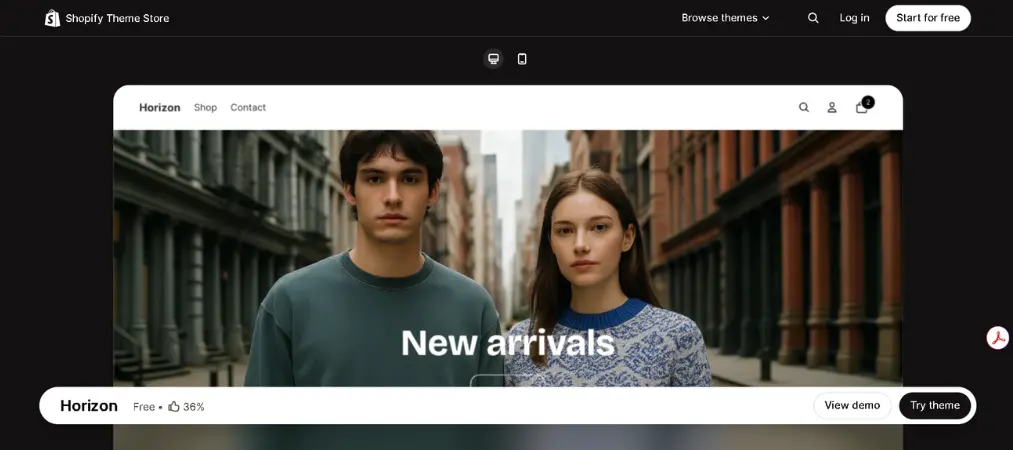
Features:
- Full-width media sections and editorial grids
- Advanced collection filtering
- Quick add to cart
- Sticky navigation bar
- Support for large variant catalogs
Pricing: Free
Pros:
- Designed specifically for visual merchandising and seasonal collections
- Excellent desktop load time (0.9s LCP) for image-heavy stores
- Supports complex catalogs with strong filter functionality
- High-end aesthetic without premium pricing
Cons:
- Mobile LCP slightly higher (2.2s) for media-heavy stores
- Less suited for stores with small or simple product lines
- Configuration takes more time to get right
Best for: Fashion, apparel, footwear, and lifestyle brands with medium to large catalogs
Rating: 4.6/5
3. Spotlight — Best for Single-Product Stores
Spotlight is built for merchants who want to launch quickly with a clean, conversion-focused layout. Its structure is intentionally simple, guiding shoppers from discovery directly to the checkout button.
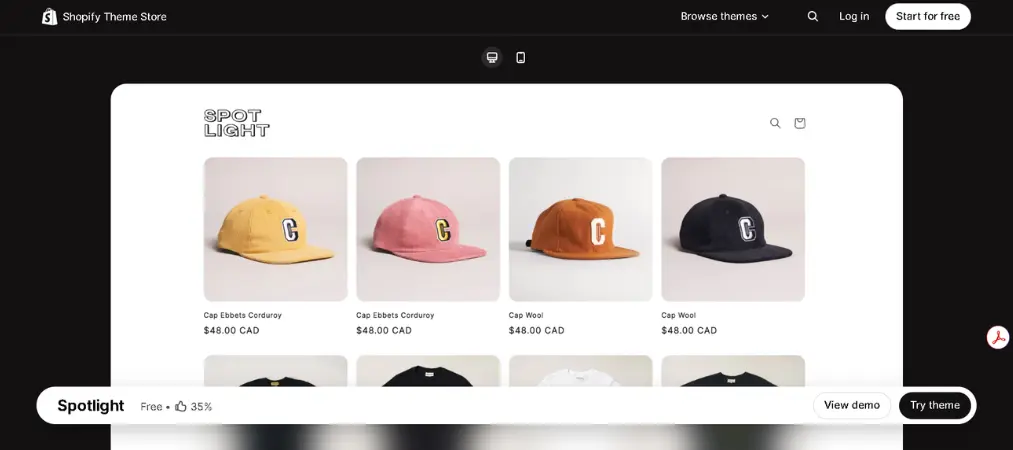
Features:
- One-page product focus layout
- Bold call-to-action sections
- Simplified navigation
- Announcement bar
- Quick buy support
Pricing: Free
Pros:
- Fastest desktop load time among free templates (0.8s LCP)
- 96.9% of stores achieve a “Good” LCP in real-user testing
- Ideal for brands launching with a focused product range
- Low visual complexity means less distraction for buyers
Cons:
- Not suited for stores with large or complex catalogs
- Limited layout variety for brands requiring editorial storytelling
- Fewer section options compared to Dawn or Horizon
Best for: Single-product brands, accessory stores, early-stage DTC merchants, niche stores
Rating: 4.5/5
4. Sense — Best Free Template for Beauty & Wellness
Sense is designed for emotionally driven commerce. It uses layered visuals, soft transitions, and benefit-led content blocks that help beauty and wellness brands build trust and communicate product value without cluttering the buying journey.
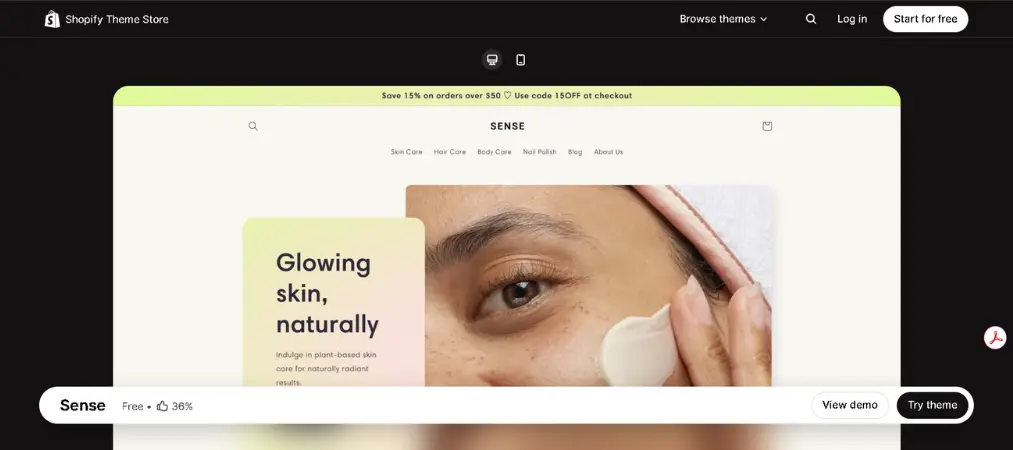
Features:
- Testimonial and review sections
- Rich media content blocks
- Benefit-led product layouts
- Mobile-first grid system
- Quick buy functionality
Pricing: Free
Pros:
- Excellent for storytelling-driven brands
- Strong visual hierarchy that builds trust before the buy button
- Desktop speed score of 97/100
- Works well with high-quality lifestyle photography
Cons:
- Mobile LCP of 3.1s is higher than other free templates
- Mobile speed score of 77/100 may need optimization for image-heavy stores
- Less suited for tech, sports, or catalog-heavy niches
Best for: Skincare, beauty, wellness, and lifestyle brands
Rating: 4.4/5
5. Ride — Best Free Template for Sports & Electronics
Ride is built for technical products and performance-driven brands. It supports spec-heavy layouts, comparison sections, and structured content blocks that help customers evaluate products before they buy.
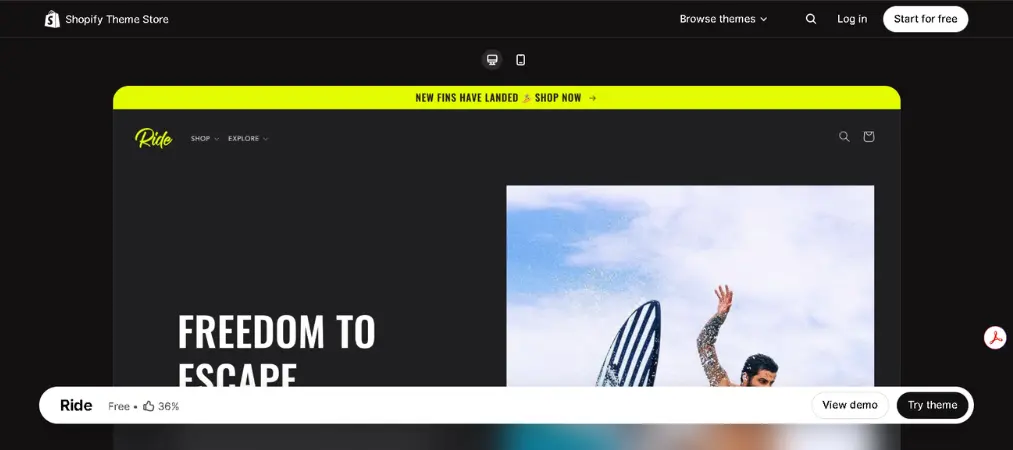
Features:
- Specification tables and comparison blocks
- Sticky add-to-cart bar
- Structured product page sections
- Advanced collection filtering
- Mobile-optimized navigation
Pricing: Free
Pros:
- 97.5% of stores achieve a “Good” LCP — one of the highest rates among free templates
- Excellent for stores where product specs drive purchase decisions
- Fast desktop load time (0.9s LCP)
- Strong at communicating product differentiation
Cons:
- Visual style is utilitarian and may not suit lifestyle or fashion brands
- Moderate customization depth compared to Dawn
- Better suited for smaller to mid-sized catalogs
Best for: Electronics, fitness gear, sports equipment, tech accessories
Rating: 4.5/5
6. Craft — Best Free Shopify Template for Home Goods
Craft is tailored for brands that sell through detail and craftsmanship. Its generous whitespace, tactile layouts, and editorial sections elevate handmade and premium products while keeping load times competitive.
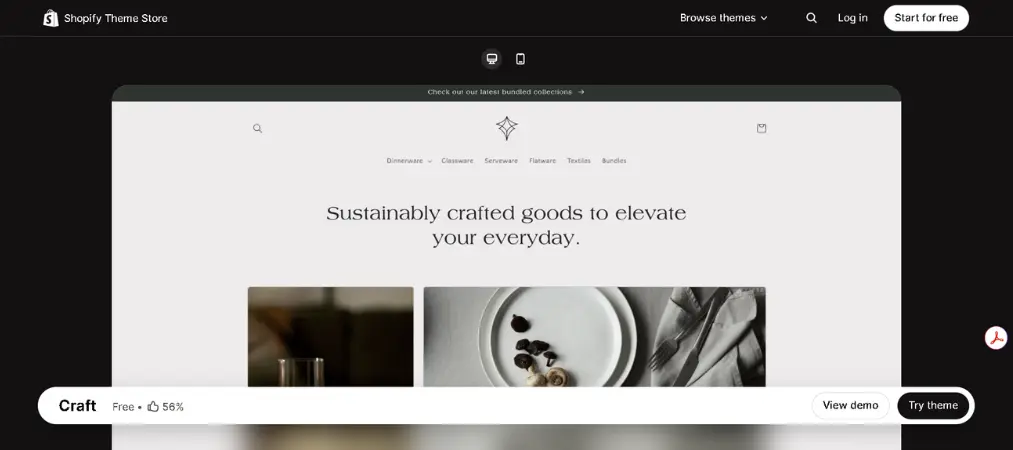
Features:
- Immersive image galleries
- Brand storytelling sections
- Refined typography controls
- Collection filtering
- Quick view on product grids
Pricing: Free
Pros:
- 96.4% of stores achieve a “Good” LCP rating
- Clean, premium aesthetic that communicates quality and craftsmanship
- Works well for brands that rely on heritage and story
- Strong gallery support for detailed product presentation
Cons:
- Not ideal for high-volume or technical product categories
- Desktop load time (1.1s) is slightly slower than Spotlight or Ride
- Moderate section depth — fewer layout presets than Dawn
Best for: Home decor, handmade goods, boutique brands, artisan products
Rating: 4.5/5
7. Taste — Best for Bold Lifestyle & Accessory Brands
Taste is a high-impact free Shopify template built for brands with strong visual identity. It uses bold color blocks, animated content, and expressive typography to help accessory and lifestyle brands stand out while keeping the path to purchase direct.
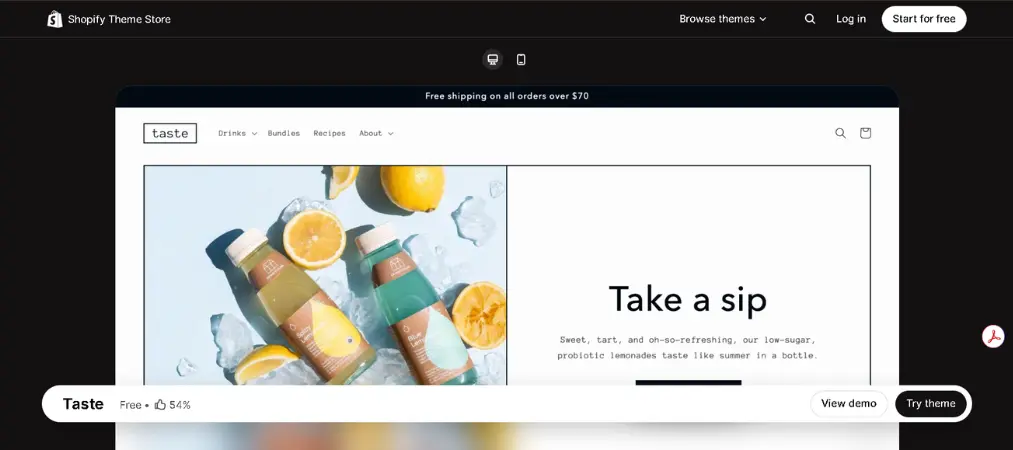
Features:
- Bold section styling with color block design
- Animated content blocks
- Mobile-optimized navigation
- Quick buy
- Featured collection highlights
Pricing: Free
Pros:
- 97.9% of stores achieve a “Good” LCP — highest rate among top free templates
- Strong brand expression out of the box
- Excellent mobile load time (2.2s LCP)
- Memorable design that supports social-first and DTC brands
Cons:
- Bold styling can clash with subtle or neutral brand palettes
- Less suited for technical or spec-heavy products
- Desktop LCP of 2.4s is slightly higher than some alternatives
Best for: Accessories, lifestyle products, bold DTC brands, statement-driven stores
Rating: 4.4/5
How to Choose the Right Free Shopify Template
With so many strong free Shopify templates available, the right choice depends on your specific store model. Here are the criteria that matter most:
1. Catalog Size and Complexity Templates like Dawn and Horizon scale well with large catalogs. Spotlight and Taste work better for focused, smaller collections.
2. Product Type and Visual Needs Beauty and lifestyle brands benefit from editorial-rich templates like Sense and Craft. Technical or sports products are better served by Ride’s structured layouts.
3. Mobile Performance All templates above meet Shopify’s performance standards, but Spotlight (2.1s mobile LCP) and Horizon (2.2s) lead for mobile-first audiences.
4. Brand Aesthetic Minimal and versatile: Dawn. Fashion-forward: Horizon. Bold and expressive: Taste. Artisan and premium: Craft.
5. SEO and Content Structure Every template listed uses clean HTML, semantic heading structure, and supports content blocks that help collection and product pages rank organically.
How to Install a Free Shopify Template (Step-by-Step)
Installing one of the best free Shopify templates takes less than five minutes. Here is how:
Step 1: Navigate to the Shopify Theme Store.
From your Shopify admin, go to Online Store > Themes > Visit Theme Store. You will land on the official theme marketplace.
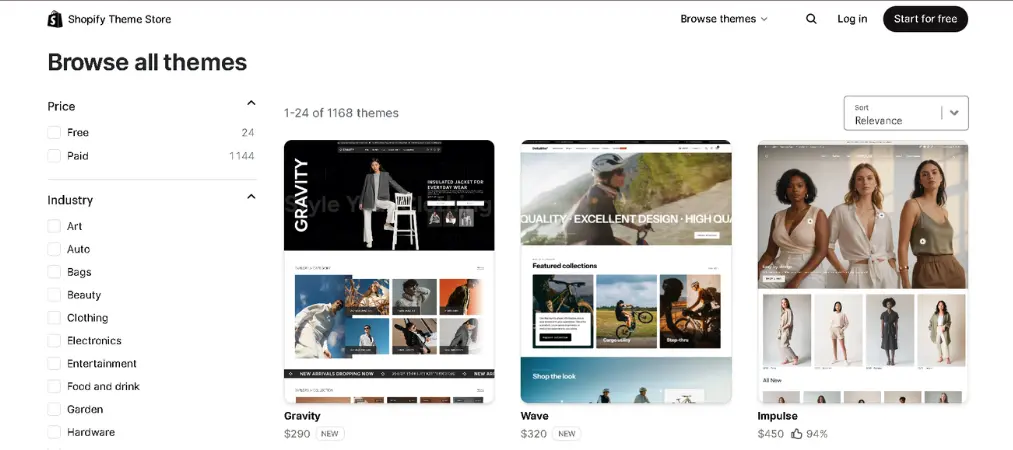
Step 2: Filter by Free.
On the left sidebar, select the Price filter and choose Free. You will see all currently available free templates, including every theme on this list.
Step 3: Preview before you commit.
Click any theme to open its detail page. Use the desktop and mobile preview toggles to see exactly how it will look across devices. Most templates also have live demo stores you can explore.
Step 4: Add the theme to your store.
Click the ‘Add’ button on the theme detail page. Shopify will add it to your theme library under Online Store > Themes. It will not go live automatically — your current theme stays active.
Step 5: Customize using the editor.
Click Customize next to the new theme. Use Shopify’s drag-and-drop sections editor to upload your logo, set your brand colors, add your products to homepage sections, and configure navigation.
Step 6: Publish when ready.
Once you are happy with the customization, click Actions > Publish. Your store will switch to the new theme. You can always revert to your previous theme instantly — Shopify stores your last three theme versions.
Customization Tips for Higher Conversions
Choosing the right free Shopify template is only the beginning. Here is how to maximize performance once it is live:
- Place your product value proposition, price, and CTA above the fold on mobile
- Enable sticky headers or floating add-to-cart bars for scroll-friendly navigation
- Use high-resolution hero images but limit initial image load count to protect speed
- Add trust signals near the buy button — return policies, shipping timelines, payment badges
- Configure collection filters to be visible and accessible without extra clicks
- Replace dropdown variant selectors with visual swatches where possible
- Add short benefit-led copy blocks within product pages to answer buyer hesitation
- Keep navigation shallow — no product should be more than two clicks from the homepage
Got Questions? We’ve Got Answers

Are free Shopify templates good enough for serious stores?
Yes. Shopify’s free templates are designed and maintained by Shopify itself, built for Core Web Vitals performance, and used by high-traffic DTC brands around the world.
Which free Shopify template is the fastest?
Spotlight leads on desktop (0.8s LCP) and Taste has the highest percentage of real-user stores achieving a “Good” LCP score at 97.9%.
Can I switch templates without losing my content?
Yes. Switching templates in Shopify does not affect your products, collections, or URLs. You may need to reconfigure sections and custom content blocks.
Do free Shopify templates support large catalogs?
Yes, particularly Dawn, Horizon, and Ride — which include advanced filtering and collection management features suited to larger inventories.
Will my template choice affect SEO?
Template selection affects page speed and content structure, both of which influence SEO. Faster, cleaner templates tend to support stronger organic rankings. All templates listed above are built with SEO-friendly markup.
Ready to Build Your Store?
Recently, free Shopify templates have closed the gap with premium alternatives in almost every measurable way. Speed, mobile responsiveness, SEO structure, and app compatibility are all built in — at zero cost. The right free Shopify template is not the one with the most features; it is the one that fits how your customers browse, compare, and buy.
Once your template is live, the real work begins: optimizing your product pages, streamlining your checkout, and making sure every operational detail runs smoothly. That includes your order documentation. Tools like Vify Order Printer help you create professional invoices, packing slips, and receipts that reflect the same quality as your storefront. If you are looking for the right solution, check out our breakdown of the best Shopify invoice generators to find the one that fits your workflow.
Your store does not need an expensive theme to look and feel premium. It needs the right foundation, the right tools, and a clear focus on the buyer experience. Start with one of the best free Shopify templates above, and build from there.